
Yang Perlu Disiapkan Saat Sewa Studio Green Screen di Jakarta
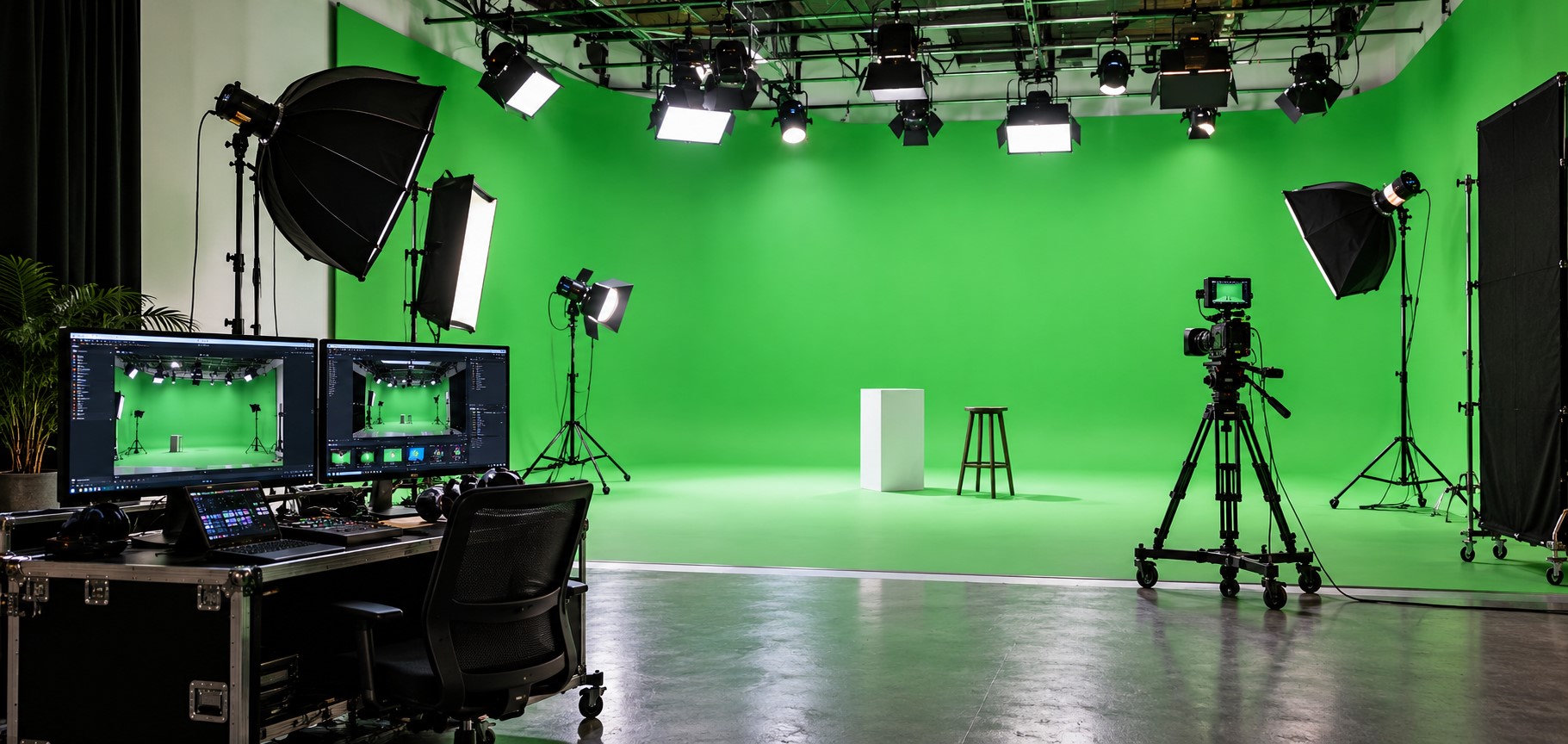
Shooting Star Studio menyewakan dua studio green screen di Pondok Labu, Jakarta Selatan Studio 2 untuk produksi besar, Studio 3 untuk tim kecil. Studio 2 berukuran 10 × 14 × 7,5 m dengan green screen dan black screen, mulai Rp5,8 juta; Studio 3 berukuran 8 × 10 × 5 m dengan green screen, mulai Rp2 juta untuk 6 jam.
Green screen sering dianggap jalan pintas. Latar apa pun bisa dipasang belakangan, jadi tinggal rekam talent di depan layar hijau dan urusan selesai di editing. Dalam praktiknya justru sebaliknya. Hampir semua masalah green screen baru kelihatan di meja editor, saat jadwal syuting sudah lewat dan tidak ada lagi kesempatan mengulang. Layar yang cahayanya tidak rata, talent yang berdiri terlalu dekat ke layar, atau dasi hijau yang lolos dari pemeriksaan kostum, masing-masing bisa menambah jam keying, yaitu pekerjaan menghapus latar hijau di editing. Semuanya bisa dicegah sebelum kamera merekam, dan sebagian besar ditentukan oleh satu keputusan: ruang mana yang Anda sewa.
Artikel ini untuk Anda yang sedang mencari studio green screen di Jakarta, entah untuk video brand dengan latar virtual, video produk, live streaming dengan set virtual, atau insert iklan. Kami jelaskan dulu cara kerja green screen dan di mana biasanya gagal, lalu cara memilih antara Studio 2 dan Studio 3, dan apa yang sudah termasuk dalam sewa.
Cara kerja green screen, dan kenapa harus hijau

Pada syuting green screen, talent direkam di depan layar satu warna. Saat editing, warna itu dihapus dengan proses yang disebut chroma key, lalu diganti latar lain: ruang virtual, grafik, atau lokasi yang tidak sempat didatangi. Hijau dipilih karena jauh dari warna kulit dan rambut manusia, sehingga software editing bisa membuang latar tanpa ikut membuang talent. Black screen bekerja dengan prinsip lain: latar hitam tidak dihapus, tetapi dibiarkan gelap untuk tampilan yang lebih dramatis, jadi tidak perlu keying sama sekali.
Chroma key hanya bersih kalau tiga syarat terpenuhi: warna layar rata di seluruh bidang yang masuk frame, tidak ada pantulan hijau di tubuh talent, dan tidak ada warna hijau lain di dalam frame. Tiga syarat itulah yang menentukan ruang, lampu, dan kostum.
Studio 2 atau Studio 3

| Studio 2 | Studio 3 |
Ukuran ruang | 10 × 14 × 7,5 m | 8 × 10 × 5 m, sekitar 80 m² |
Layar | Green screen dan black screen | Green screen, termasuk sewa |
Client room | Ya | Tidak |
Ruang rias | Make-up room | Make-up area |
Sewa mulai | Rp5,8 juta (lihat halaman harga) | Rp2 juta untuk 6 jam |
Pilih Studio 2 kalau produksi Anda besar, konsepnya butuh black screen, atau tim klien perlu ruang sendiri untuk memantau hasil tanpa masuk ke area set. Studio 2 punya built-in rigging, yaitu titik gantung permanen di atas set, sehingga lampu layar bisa digantung tanpa memakan lantai. Pilih Studio 3 kalau timnya kecil dan anggarannya ketat; ruangnya lebih pendek, jadi jarak talent ke layar perlu dihitung lebih cermat (lihat poin 2). Studio 1 tidak punya green screen. Klien bernama Coco menulis di Google bahwa loading barang di sini mudah karena dibantu tim, dan tempatnya cocok untuk membuat mini TVC.
Tiga hal yang menentukan hasil keying

1. Lampu layar dan lampu talent dipisah.
Banyak tim menerangi layar dan talent dengan lampu yang sama, karena satu set lampu terasa cukup di mata, padahal kamera menangkap perbedaan terang yang tidak terlihat langsung. Layar butuh cahaya rata dari lampu tersendiri, biasanya dua lampu lembut dari kiri dan kanan; talent butuh lampunya sendiri. Sebelum talent masuk set, cek layar di monitor: kalau ada bagian yang lebih terang atau lebih gelap, perbaiki sekarang, bukan di editing. Di kedua studio, sewa sudah termasuk dua lampu Godox SL 60 (tergantung ketersediaan), cukup untuk talent tetapi tidak untuk layar sekaligus, jadi bawa lampu tambahan khusus layar.
2. Jarak talent ke layar.
Talent yang berdiri terlalu dekat ke layar terkena spill, yaitu pantulan hijau dari layar yang jatuh ke tepi tubuh talent dan membuat garis keying jadi kotor. Biasanya tim mengatur posisi dari frame kamera, lalu baru sadar ruangnya tidak cukup panjang. Jarak 3 sampai 4,5 meter umumnya cukup. Hitung jarak itu sebelum memilih ruang, karena kamera masih perlu tempat di belakang talent. Kalau ruangnya terasa pendek, persempit frame atau pakai lensa yang lebih panjang; jangan mendekatkan talent ke layar. Tandai posisi talent di lantai supaya jaraknya sama di setiap take.
3. Tidak ada hijau di dalam frame.
Kostum biasanya diperiksa di ruang rias, bukan di depan layar, dan di situlah hijau lolos: dasi hijau akan tampak bolong, celana khaki yang kehijauan jadi tembus pandang, dan bahan mengilap bisa memantulkan warna layar. Minta talent membawa dua pilihan kostum dan periksa keduanya di depan layar sebelum riasan selesai; Studio 2 punya make-up room dan Studio 3 punya make-up area untuk itu. Periksa juga properti: botol, map, atau logo berwarna hijau sering lolos.
Yang sudah termasuk dalam sewa

Harga kami adalah harga sewa ruang, kru dan peralatan Anda bawa sendiri, dan layanan di luar daftar berikut dihitung terpisah. Sewa sudah mencakup table and bench set, valet service, smoking area di rooftop, IT technician standby saat live streaming dan untuk Studio 3 juga listrik 5.000 W. Ruang tambahan bisa dipesan per 12 jam dengan booking dua hari sebelumnya: client room mulai Rp850 ribu, make-up room mulai Rp1 juta. Layar tambahan disewa per hari: green screen besar atau black screen besar Rp2,5 juta, green screen kecil Rp1,5 juta (halaman harga).
Harga: Studio 2 mulai Rp5,8 juta; Studio 3 mulai Rp2 juta untuk minimum 6 jam.
Lokasi: Jl. Margasatwa No.11, Pondok Labu, Jakarta Selatan, sekitar 15 menit dari Tol Andara.
Booking: +62 812-8890-7116.
Tentang Shooting Star Studio. Tiga studio kami berada di Jl. Margasatwa, Pondok Labu, dan disewakan untuk syuting video, pemotretan, dan live streaming. Spesifikasi setiap studio bisa Anda lihat di halaman studio.
Green Screen Studio Hire in Jakarta, What to Prepare?
Shooting Star Studio hires out two green screen studios in Pondok Labu, South Jakarta: Studio 2 for large productions, Studio 3 for small teams. Studio 2 measures 10 × 14 × 7.5 m with a green screen and a black screen, from IDR 5.8 million; Studio 3 measures 8 × 10 × 5 m with a green screen, from IDR 2 million for 6 hours.
Green screen is often treated as a shortcut. Any background can go in later, so you just film the talent in front of the green and sort it out in the edit. In practice it works the other way round. Almost every green screen problem only shows up at the editor's desk, after the shoot days are over and there is no chance to go again. A screen that is unevenly lit, talent standing too close to it, or a green tie that slipped past the wardrobe check can each add hours of keying, the work of
removing the green background in the edit. All of it can be prevented before the camera rolls, and most of it comes down to one decision: which room you hire.
This article is for you if you are looking for a green screen studio in Jakarta, whether for a brand video with a virtual set, a product video, a live stream with a virtual background or an ad insert. We first explain how green screen works and where it usually fails, then how to choose between Studio 2 and Studio 3, and what the hire includes.
How green screen works, and why it is green

On a green screen shoot, the talent is filmed in front of a single-colour screen. In the edit, that colour is removed by a process called chroma key and replaced with another background: a virtual room, graphics, or a location you could not get to. Green is used because it sits far from the colours of human skin and hair, so editing software can drop the background without dropping the talent with it. A black screen works differently: the black is not removed but left dark for a more dramatic look, so it needs no keying at all.
Chroma key only comes out clean when three conditions are met: the screen colour is even across everything in frame, there is no green reflected onto the talent, and there is no other green in the frame. Those three conditions decide the room, the lights and the wardrobe.
Studio 2 or Studio 3

| Studio 2 | Studio 3 |
Room size | 10 × 14 × 7.5 m | 8 × 10 × 5 m, about 80 m² |
Screen | Green screen and black screen | Green screen, included in hire |
Client room | Yes | No |
Make-up | Make-up room | Make-up area |
Hire from | IDR 5.8 million (see the pricing page) | IDR 2 million for 6 hours |
Choose Studio 2 if your production is large, the concept needs a black screen, or the client team needs its own room to watch the results without stepping onto the set. Studio 2 has built-in rigging, meaning fixed hanging points above the set, so screen lights can be hung without taking up floor space. Choose Studio 3 if the team is small and the budget is tight; the room is shorter, so the distance from talent to screen needs more careful planning (see point 2). Studio 1 has no green screen. A client named Coco wrote on Google that loading gear in is easy because the team helps, and that the place suits a mini TV commercial.
Three things that decide the key

1. Light the screen and the talent separately.
Many teams light the screen and the talent with the same lamps, because one set of lights looks fine to the eye while the camera picks up differences in brightness the eye misses. The screen needs even light from its own lamps, usually two soft lights from left and right; the talent needs its own. Before the talent steps in, check the screen on a monitor: if any part is brighter or darker, fix it now, not in the edit. In both studios the hire includes two Godox SL 60 lights (subject to availability), which is enough for the talent but not for the screen as well, so bring extra lights just for the screen.
2. Keep the talent back from the screen.
Talent standing too close to the screen picks up spill: green light bouncing off the screen onto the edges of the body, which makes the key line dirty. Teams usually set positions from the camera frame and only then find the room is not long enough. A distance of 3 to 4.5 metres is usually enough. Work that distance out before you choose the room, because the camera still needs space behind the talent. If the room feels short, tighten the frame or use a longer lens; do not move the talent closer to the screen. Mark the talent's position on the floor so the distance is the same on every take.
3. No green in the frame.
Wardrobe is usually checked in the make-up room, not in front of the screen, and that is where green slips through: a green tie leaves a hole, greenish khaki trousers turn see-through, and shiny fabric can reflect the screen colour. Ask the talent to bring two outfit options and check both in front of the screen before make-up is finished; Studio 2 has a make-up room and Studio 3 a make-up area for this. Check the props too: green bottles, folders or logos often slip through.
What the hire includes

Our prices cover the room, you bring your own crew and equipment, and services outside the list below are charged separately. The hire includes a table and bench set, valet service, a rooftop smoking area, an IT technician on standby during live streaming [Shooting Star team to confirm: the pricing page lists this as included, the About page lists it as an add-on], and for Studio 3, 5,000 W of electricity. Extra rooms can be booked for 12 hours with two days' notice: client room from IDR 850 thousand, make-up room from IDR 1 million. Extra screens are hired by the day: large green screen or large black screen IDR 2.5 million, small green screen IDR 1.5 million (pricing page).
Price: Studio 2 from IDR 5.8 million; Studio 3 from IDR 2 million for a 6-hour minimum.
Location: Jl. Margasatwa No.11, Pondok Labu, South Jakarta, about 15 minutes from the Andara toll gate.
Booking: +62 812-8890-7116.
About Shooting Star Studio. Our three studios are on Jl. Margasatwa in Pondok Labu and are hired for video shoots, photography and live streaming. [Shooting Star team to confirm: the home and About pages say three studios, the Studio page still lists Studio 5] You can find the specifications for each studio on the studio page.